WhatsApp is one of the apps that leads among the apps that are used in interacting online. It is popularly used for chatting, calls, and in viewing updated from others via the status features. WhatsApp has not relented in improving the user experience its platform for its users and keeps adding new and exciting features.
Lately, it added the Channels feature, putting this feature and status feature under a section it calls update. The Channels feature allows you to get updates from your favourite people, influencers, and content creators. If you are a content creator, and you wish to start a channel, you can, and the steps to do it are simple. Lets dive into the process….
How to Create WhatsApp Channels on Android or iOS
It is very easy to create a channel on WhatsApp on your Android or iOS device. The process to create a WhatsApp Channel is the same for both Android and iOS users. Follow these steps:
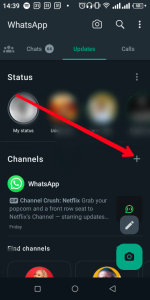
1. Open WhatsApp and navigate to the Updates tab.
2. Locate the Channels section and tap the plus icon.
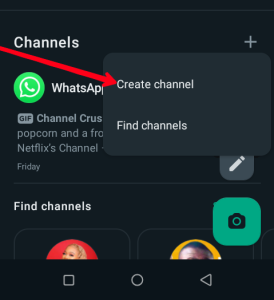
3. Select “Create channel” to initiate the process.
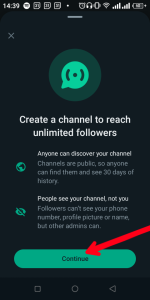
4. Follow the instructions provided in the popup window.
5. Customize the Channel by adding a name, description, and profile picture. Finally, tap “Create channel.”
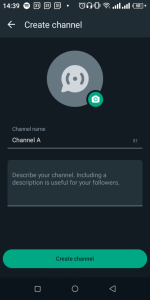
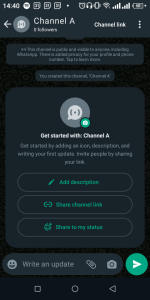
And that’s how to create a WhatsApp channel. Whenever you send a message to your channel, those messages are public and will be visible to your followers..
How to Share Your WhatsApp Channel
You can take a step further to make others aware of your channel. You can do this by sharing your channel to the world. This can increase your following and you can get more reach. Here’s how:
1. Go to your created Channel under the “Updates” tab.
2. Tap on Channel link button at the top right corner.
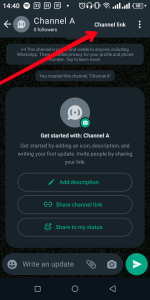
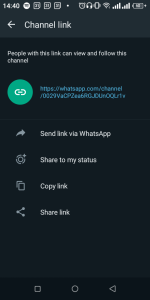
3. Choose from the available options to share the Channel’s link as needed.
How to Delete a WhatsApp Channel
You may want to do away with your WhatsApp Channel because of any reason. It is actually easy to delete your WhatsApp channel. Follow the steps below to do this:
1. Return to the Updates tab.
2. Open the Channel you wish to delete.
3. Tap the Channel’s name and select “Delete Channel” on the Channel info page.
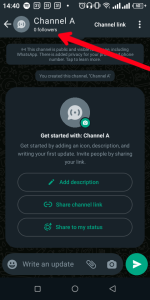
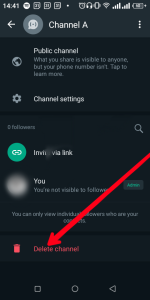
4. Confirm the deletion by following the prompts.
Remember, deleting a Channel is irreversible. Your past activity will remain visible to followers, but the Channel will no longer be seen by new users.
In Conclusion…
Channels are a great way to connect with your audience. Since most people use WhatsApp, it is great to leverage the personal relationship people have with the app, and bring them content that adds value to them. We hope you found this guide helpful if you did, kindly leave a comment, and don’t forget to share…