WhatsApp has constantly continued to be updated with new and exciting features. Before now, there was nothing like the “Message Yourself” feature on the app, but now you can have a chat to yourself where you can save important messages, Media and files. The Message Yourself feature is also handy when you want to move files from your mobile phone to and from your computer. In this guide, we will show you how to use the “Message Yourself” feature on WhatsApp…
Are there moments when you discover interesting messages, memes, or videos in your WhatsApp chats that you’d like to keep for later? While you can star messages for bookmarking, it can become cluttered and tricky to manage. However, WhatsApp has a hidden feature called “message yourself,” now available to all users, that can help solve this issue. If you’re curious about this feature or want an easy way to save notes or photos, let’s explore how to use it.
How to Send Messages to Yourself on WhatsApp
Using the “Message Yourself” Feature on WhatsApp
Not long ago, WhatsApp integrated the “Message Yourself” feature directly into the app. Here’s how to access and utilize the “message yourself” feature on both iPhone and Android:
1. Open WhatsApp and tap the “New Chat” button at the bottom right. Look for your phone number labeled as “Message yourself” in the contacts list.
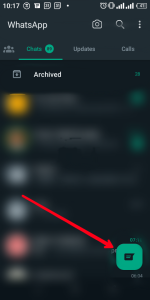
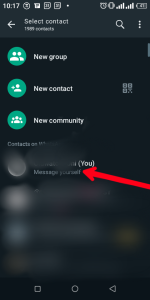
You can use this chat to send reminders, create to-do lists, or share files across the web and mobile.
If you wish to save photos or videos, tap the “forward” button next to the media in a chat window. Then, select the “message yourself” chat from the contacts list in WhatsApp.
Voilà! In the screenshots, I’ve used the “message yourself” chat to share photos and videos with myself.
You can easily access what you shared on your Android or iOS device from WhatsApp desktop or Web on your PC or Mac.
Creating a Private WhatsApp Group to Message Yourself
Even if there’s the “Message yourself” feature, you can still create a private chat using this workaround in the app. Let’s take a look:
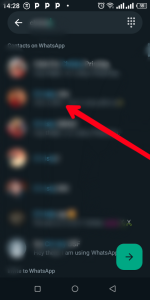
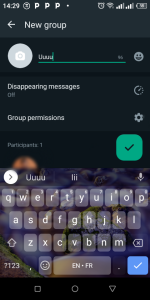
1. Tap the “New Chat” button, then select “New group.”
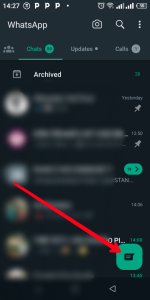
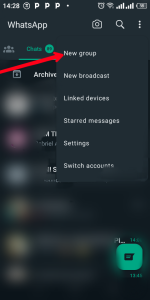
2. Add a single person, be it a friend or secondary number, to this new group. Name the group (e.g., “saved msgs” for bookmarking texts, photos, and videos) and tap the checkmark at the bottom right.
3. After creating the group, tap on the three dots icon. Long-press on the name of the second participant (apart from you) in the participant list.
8 Tap the three dots icon; Photo Credit: About Device
9 Long press the second participant; Photo Credit: About Device
4. Tap “Remove [participant name]” in the context menu that appears. Confirm your action by tapping “OK” in the pop-up window.
10 Tap “Remove [participant name]”; Photo Credit: About Device
5. As seen in the screenshots, you’re now the sole participant in this chat. You can use this WhatsApp group chat exclusively for sending yourself messages, saving memes, videos, and more.
In Conclusion…
WhatsApp is that app that is widely used by many users across the globe. Owned by Meta, it has continued to serve its users with great features to enable them have an amazing experience on the platform and the “Message Yourself” feature is one of them. We hope you found this helpful? If you did, kindly leave a comment, and don’t forget to share…