How to Check PotPlayer Version you are running or using on your computer system.
This tutorial will guide you on how to check the version of PotPlayer your computer system is running. Please follow the step highlighted below to check the version
Using Keyboard Shortcut
Launch PotPlayer
Press F1 on your keyboard to go “About”. A window will open showing you the version of PotPlayer your computer system is running and give you some information on PotPlayer.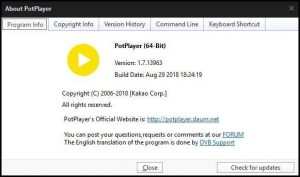
Using the Menu Bar
Launch the PotPlayer
On the left hand side, Click on PotPlayer, a drop down menu will show up, Click on About
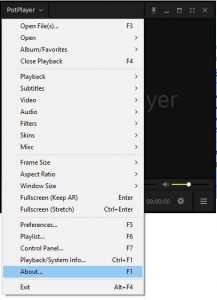
A window will open showing you the version of PotPlayer your computer system is running and give you some information on PotPlayer.
Hope with this, you have been to learnt How to Check the version of PotPlayer You are running.
Please share and like below, also comment below for any problem encountered. Thanks