How to change Homepage of Vivaldi Browser.
Start up Vivaldi Browser with this particular websiteThe Default Homepage or Start page of the Vivaldi Browser is the Vivaldi Homepage (https://vivaldi.com), To change Home Page of Vivaldi Browser, Please follow the instruction listed below:
1) Launch the Vivaldi browser.
2) On the top left hand corner, Click on the Vivaldi Browser V symbol, then Click on Tools, then Click on Settings or press Alt + P on your Keyboard 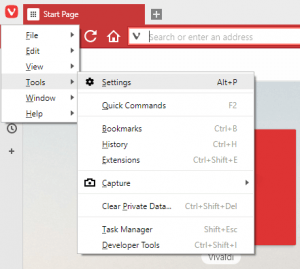
3) The Settings Window will open, on the right hand menu, you will see Homepage set to Specific page with https://vivaldi.com as the specific page, edit that and enter the link of the site you wish to make the Homepage.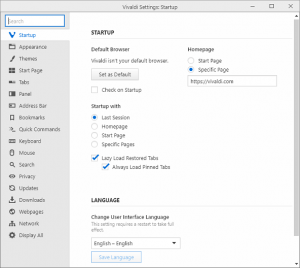
Hope with this, you have been able to learn How to change Homepage (Start Page) of Vivaldi Browser.
Please share and like below, also comment below for any problem encountered. Thanks
Going thru the same homepage setup issues as above. I really want to like Vivaldi. I love how when you click to open in new tab, it does it AND switches to it AND runs it. ie. YouTube vids. But, the homepage setup is awful. Opera is best at homepage setup, go take lessons from them. Please fix.
So I’m stuck with the default speed dial, no other speed dial can be the new page? What a stupid idea. Bye now, I’ll be forced to use Chrome.
So I’m this homepage problem is still an issue?
setting the home page is a PITA, haven’t gotten it done yet. How could the developers be this dumb?
Ok, Guys, I giveup… Been trying to change the page tu start Vivaldi, Yes, I changed the name of the page everywhere!!! I couldn’t change the startup page, sorry, I must be too dumb. So Vivaldi has a two strike count, and I see a game over very soon….
No, please try again and the settings will be changed. Thanks
Thank you. Trying Vivaldi, Old person (75), very confused!!! Will be Back!!! Hehehe. I do like Vivaldi.
Cuco Negron
San Juan, PR
Glad it was of help.
Thanks
Once you enter the new home page, HOW DO YOU SET IT – ??? THERE IS NO UPDATE BUTTON…!!!!
Please be patient, new update has changed the interface. Thanks