UC Browser (Android) Download Settings. Max (Maximum) Downloads, Location of Download on UC Browser (Android). Enable or Disable Download Notification, on UC Browser (Android).
UC Brower (Android) has the download manager settings, and UC Browser is a browser known for its download management.
In this tutorial We will check out to setup downloading on UC Browser, How to Increase or decrease the maximum number of download, find location of download file on UC Browser and learn how to enable or disable notification while downloading.
To setup UC Browser for PC both Linux, Mac and Windows to download with IDM, please follow the guide here.
1) Launch the UC Browser Browser (Android).
2) On the lower menu, Click , press or touch the three horizontal line symbol (Where the Red box is)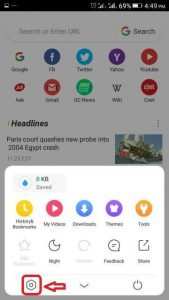
3)The Settings Window will open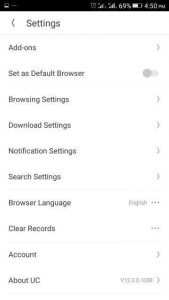
4) Click or press or touch Download Settings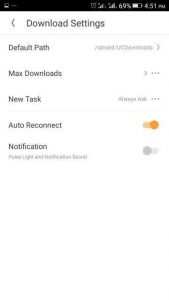
5) The Download settings will open.
Default Path
This is the location for saved download, it can be changed to any folder or location
Max Download
This means the number of downloads that are to take place concurrently. The Maximum is 6
New Task
You will be informed for a new task
Auto Reconnect
In case your network goes off, it will attempt to connect it automatically (that is when it is put ON)
Notifications
The notification are in the form of light and sound, it will tell when a download is completed and when it has started.
Hope with this, you have been able to learn How to setup Max (Maximum) Downloads, Location of Download on UC Browser (Android). Enable or Disable Download Notification, on UC Browser (Android).
Please share and like below, also comment below for any problem encountered. Thanks
UC BROWSER app download
[email protected]
When I download file it’s ok when I work other things use what’s app or fb or any thing file is stop downloading if uc browser is on then downloading is on if u work other file is stop downloading plz resolve my issue
When I download file it’s ok when I work other things use what’s app or fb or any thing file is stop downloading if uc browser is on then downloading is on if u work other file is stop downloading plz resolve my issue
Okay
How to move my saved file from UC drive to my device at the next time?
Visit UC Drive, and download files. Thanks
I think that it is a very easy to do the following. Thank you for the detailed instruction. I suppose you need to browse https://fastcustomwritinghelp.com/blog/characteristics-of-high-quality-service whereas any further questions regarding this issue arise.
The number of maximum downloads should be increased and not just 6. Or better if the user is left to decide.
sir actually when i am using uc browser ver 11.00 where when i open site
and video will open in video downside down arrow when i press down arrow
download starts