Clear Cookies, History, Cache and Browsing Data in Avant Browser. How to Clear Cookies, History, Cache and Browsing Data in Avant BrowserThe processes listed below will guide you on How to Clear Browsing Data in Avant Browser:
Using Keyboard Shortcut
1) Press Ctrl + Shift+ Delete
2) Select what you want to clear and then click on Clear Checked Item. 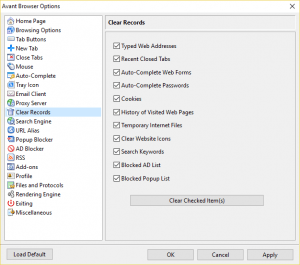
Using the Settings Window
1) Launch the Avant Browser.
2) On the top right hand corner, click on the box line symbol, then click on Options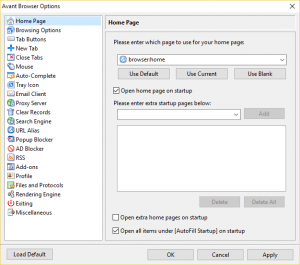
3) On the left hand tab, You will see Clear Records, Click on Clear Records.
4) Select what you want to clear and then click on Clear checked item.
Using the box symbol
1) Launch the Avant Browser.
2) On the top right hand corner, click on the box line symbol, then click on Clear Records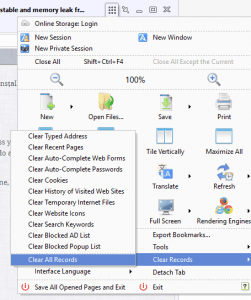
3) Then Click on Clear Records.
Hope with this you have learnt how to clear browsing data on Avant Browser.
Please share and like below. Also comment below for any problem encountered.