MPC HC – Sync Subtitle to Audio or Video. How to sync (Synchronize) subtitle with MPC HC using Keyboard shortcut or Hotkeys
MPC-HC
It stands for Media Player Classic Home Cinema, it is a great lightweight video player that supports almost all video format and codecs.
Price: Free
The MPC HC (Media Player Classic Home Cinema) stands strong among major media player for Windows.
The MPC HC also allows users to download subtitle online from opensubtitles.org and other subtitle downloading website and view subtitle while video is playing using the MPC HC player, but most or sometimes, downloaded subtitle are off sync with the video. That is sometimes the audio might be faster than the subtitle or the subtitle faster than the audio.
To download subtitle using the MPC HC player, you press D on your keyboard and the player will automatically go online and search for the subtitle (remember that it uses the name of video and its properties)
The MPC HC (Media Player Classic Home Cinema) has a way to solve this problem, in fact using Hotkeys or Keyboard Shortcut Keys. But first let’s learn how to load subtitle into SMPlayer in order to be able to sync or synchronize the subtitle perfectly.
1. First of all, launch the MPC HC Player. (Open the video, you want to synchronize (sync) the subtitle).
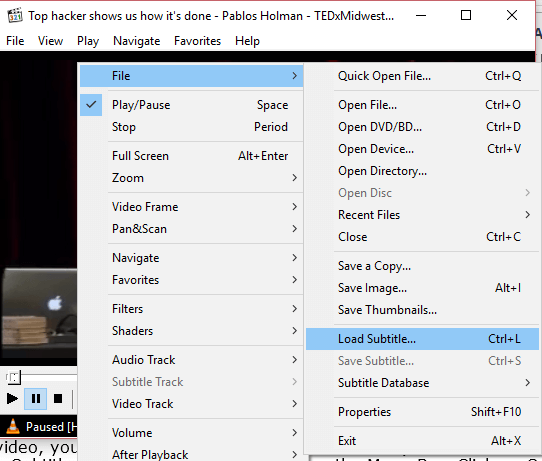
2. Right Click on the MPC HC Window, Click on File and then Click on load subtitle OR press Ctrl + L on your keyboard.
3. A window will open, go to the location where downloaded subtitle was kept or where the subtitle file is and select it in order to load it by clicking on Open

In order to sync the subtitle for the MPC HC Player, This is what you are to do:
The Keyboard shortcut or hotkeys that are used to sync or synchronize subtitle in the MPC HC Player the functions keys F1 and F2
Sync Subtitle Using Keyboard Shortcut on MPC HC
x :To make it faster (It is always close to the shift key): This should be used when subtitle is slower than the audio (100 milliseconds)
F1 :To make or reduce the subtitle speed it (It is above the numerical keys on the keyboard): This should be used when the subtitle is faster than the audio (for every pressing of the F1 keys, the subtitle speed or delay is reduced by 500 milliseconds).
F2 :To make or increase the subtitle speed it(It is above the numerical keys on the keyboard): This should be used when the subtitle is slower than the audio (for every pressing of the F1 keys, the subtitle speed or delay is increased by 500 milliseconds).
Enable or Disable Subtitle Visibility on MPC HC
W: on or off subtitle (subtitle visibility).
To prevent make sure you download subtitle file with the same name as you file, the same audio type and the same quality (as in 480p, 720p, 1080p, 2K, 4K) and download subtitle with high up vote.
Please Comment below for any problem faced and share below.
Your software is amazing! Wow, just wow.
Thank you very very much!
the subtitles are faster than the sound
How can i delay embedded subtitles?!
please help
F1 & F2 is not woking
F1 & F2 + function key is not working
F1 & F2 + enter key is not working !
F1 & F2 + space key is not working !!
F1 & F2 + alt key is not working !!!
F1 & F2 + ctrl key is not working !!!!
F1 & F2 + fuck key is not working !!!!!!!!!!!!!!!!!!!!!!!!!!!!!
Do you Undrerstand ?????
Please what version of MPC HC are you using?
Thanks a lot really helpful
You are welcome
F1 ,F2 doesnt work
28.7.2020
Please the function keys are used, those above the numeric key on Your keyboard. Thanks
We know where they are, dumbass. It doesnt work.
You have to press the “Fn” key at the left bottom (red letter) at same time when pressing F1 or F2 – I won’t call you ‘dumbass’.
It also works on some computers without pressing the fn key. Thanks
Use subtitle menu; ctrl+6 if you’ve already loaded a subtitle. Then you need to pause just at the beginning of any sentence of any conversation and find the line corresponding to that sentence and then right click on it choose “Current (F5)”.
Thank you so much for the info; that would save me tons of time watching GoT.
thank you so so so much
it saved me rn
this is epic info thank you so much <3
ziv bio!
I am here posting this reply comment to thank you, and you alone.
You are a true savior.
I hope for you all the best in life. Wish you good health, and prosperity.
People like you should be sculpted, and remembered for the ends of time.
Now I leave with all great wishes for you, peace to you my good savior. It was a pleasure reading your comment.
thanks mate
Both find. But how to select the subtitle to relevent frame??
It changes the subtitle sync but not the speed. Lots of times subtitles keep getting delayed or advanced and you need to keep using F1 or F2 every few seconds. How can we change the speed, so we don’t have to keep fixing it while we watch something?
For me the following worked:
go to view > options > subtitles.
In the top right-hand corner you will see “delay step” – set it to a value greater than “0”. I set it to 100ms.
Aplly the changes and click on OK.
If you now use the “F1” and “F2” keys the subtitles will be delayed or sped up by the increment you entered (e.g. 100ms).
Hope this helps.
F1 and F2 moves the subtitles 500MS which is WAY WAY too much. It used to be like 10MS .. what happened? How do we fik it???
Nevermind.. I am blind.
F1, F2 doesn’t work
press Fn+F1/F2
Thanks for this.
You can’t help those that already think they are genus’s.. 🙂
do you know if I can save the slowdown of the subtitles.
You cannot save it on MPC HC. You can edited subtitles settings using notepad or Aegisub.
f1 opens windows help from computer
F1 opens windows help!
use fn with f1 and f2 respectively
Please do make sure you click on Main Window of MPC HC player and then press the F1 and F2 key for subtitle syncing, it will work
F1 and F2 NEVER worked, why?
The Function keys are the keys. The keys above 1, 2 to 0. You will see them F! to F12
just use fn with f1 and f2
Please do make sure you click on Main Window of MPC HC player and then press the F1 and F2 key for subtitle syncing, it will work