


Facebook offers a feature to hide posts from your timeline, which can be useful for concealing content you’d rather not share publicly. Whether it’s an embarrassing post or a tagged photo you’d rather keep private, hiding it is a simple process. However, if you change your mind and want to make the post visible again, the process isn’t as straightforward. In this article, we’ll guide you through the steps to unhide a post on Facebook, ensuring that you can easily revert your decision and make the post shareable once more.
How to Unhide Posts on Facebook on Web
To unhide posts on Facebook, follow these steps:
1. Open your Facebook page in a browser and log in.
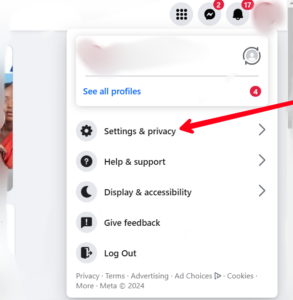
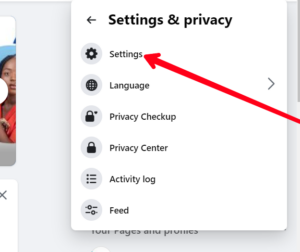
2. Click on your Profile icon at the top right corner, then select Settings & privacy > Settings




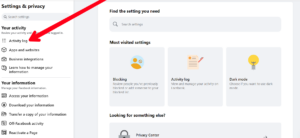
3. Under Settings, click on “Activity log”..

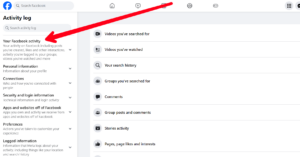
4. Choose “Your Facebook Activity” and then select “Posts.”


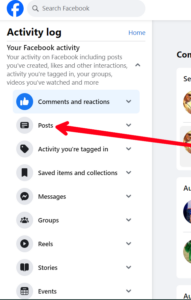
5. To unhide a post, navigate to “Posts hidden from your profile,” click the three-dots icon next to the post, and select “Add to profile” to restore it.

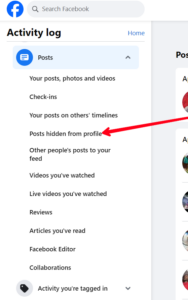




If some posts lack the three-dot menu, try refreshing the page or using the mobile app method.
How to Unhide Posts on Facebook on Android or iPhone
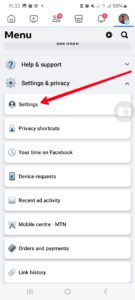
1. Open the Facebook app and tap the hamburger menu at the top right.
2. Tap “Settings & Privacy” > “Settings”, then scroll down and select Activity log.



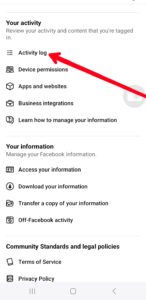
3. In the Activity log, select “Your Facebook Activity”
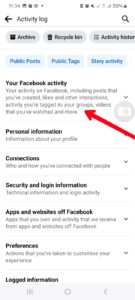
4. After that, choose “Posts”.
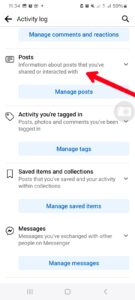
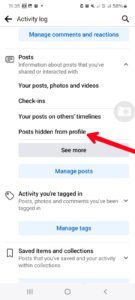
5. Tap on “Posts hidden from profile” to view hidden post
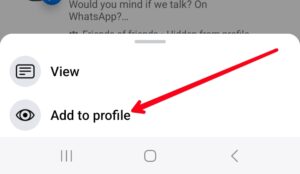
6. To unhide a post, tap the three-dot icon next to it and choose “Add to profile.”
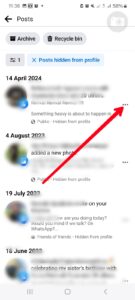

Restoring hidden posts will make them visible on your timeline, allowing your friends to interact with them according to privacy settings. If needed, you can hide posts again by moving them to the archive. Simply tap the three-dot icon on the post and select “Move to Archive.” This action hides the post from your timeline while keeping it accessible to you for later restoration.
In Conclusion…
Unhiding a post on Facebook may seem tricky at first, but with our simple guide, you’ll be able to make any post shareable again in no time. Whether it’s a funny status update or a memorable photo, you can rest assured knowing that you have full control over your Facebook timeline. So, the next time you decide to unhide a post, just follow the steps outlined in this article, and you’ll have it back on your timeline for all to see.